Astronomical Data
The Astronomical Data window is opened by selecting "Tables" from main menu or by
clicking the  "Tables" Toolbar button,
then selecting the "Astronomical Data" menu item.
"Tables" Toolbar button,
then selecting the "Astronomical Data" menu item.
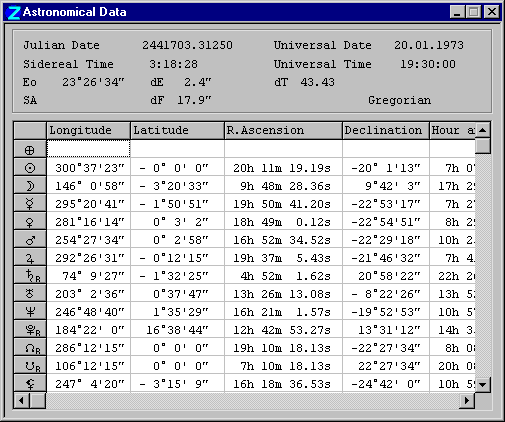
The header panel contains the following general information for the current time:
- Julian date equivalent of the current event time and date (Universal Date and Time),
- local sidereal time,
- Ephemeris amendment (dT),
- Sidereal Ayanamsa (SA) - the difference between tropical and sidereal zodiacs, if a sidereal zodiac has been selected,
- Average obliquity of the ecliptic (Eo) - the inclination of the Earth's rotational axis, which also determines the maximum value of declination of the ecliptic,
- Equatorial inclination of nutation (dE),
- Equatorial longitude of nutation (dF).
The astronomical data for planets and other bodies is as follows (unless the display has been customized - see popup menu options below):
- Ecliptical geocentric longitude,
- Ecliptical geocentric latitude,
- Equatorial right ascension,
- Declination,
- Hour angle,
- Altitude,
- Horizontal azimuth (i.e. bearing),
- Distance from the Earth (in kilometers for the Moon and Lilith; otherwise in Astronomical Units),
- Angular speed (ecliptical geocentric) in degrees per day,
- Maximum angular speed,
- Angular speed as a percentage of maximum,
- Angular diameter (apparent visible size) in arc-minutes,
- Inclination of the planet orbit to the ecliptic (i)
- Eccentricity of orbit (eks),
- Semimajor axis of orbit in a.u. (A),
- Longitude of the Ascending Node of the orbit (O),
- Perihelion of orbit (P),
- Ecliptical heliocentric longitude (l)
- Ecliptical heliocentric latitude (b),
- Radius-vector planet - Sun in a.u. (R),
- Rectangular ecliptical heliocentric coordinates in a.u. (X, Y, Z),
- Longitude of the north pole of the orbit,
- Latitude of the north pole of the orbit.
Click the right mouse button in the table to display a popup menu with the following options:
- Decimal format - sets a decimal-fraction degree format for displaying the table data (rather than degrees, arc-minutes, arc-seconds where appropriate),
- Save As... - opens a file Save dialog, allowing you to save the table to a plain text file. The planet data section of the file consists of tab-separated items. The suggested folder and file name is [ZET]\Wrk\Astro.txt,
- Copy Cell - copies the data of the cell under the mouse pointer when the menu was invoked to the Clipboard.
- Columns... - opens the Column Manager dialog. You can select which columns will be displayed by marking the checkboxes in the list of column headers. To rearrange the order of columns in the table, click the pair of buttons at right to move the highlighted item up or down the list.